How to Post to All Social Media at Once (Free and Paid Ways)
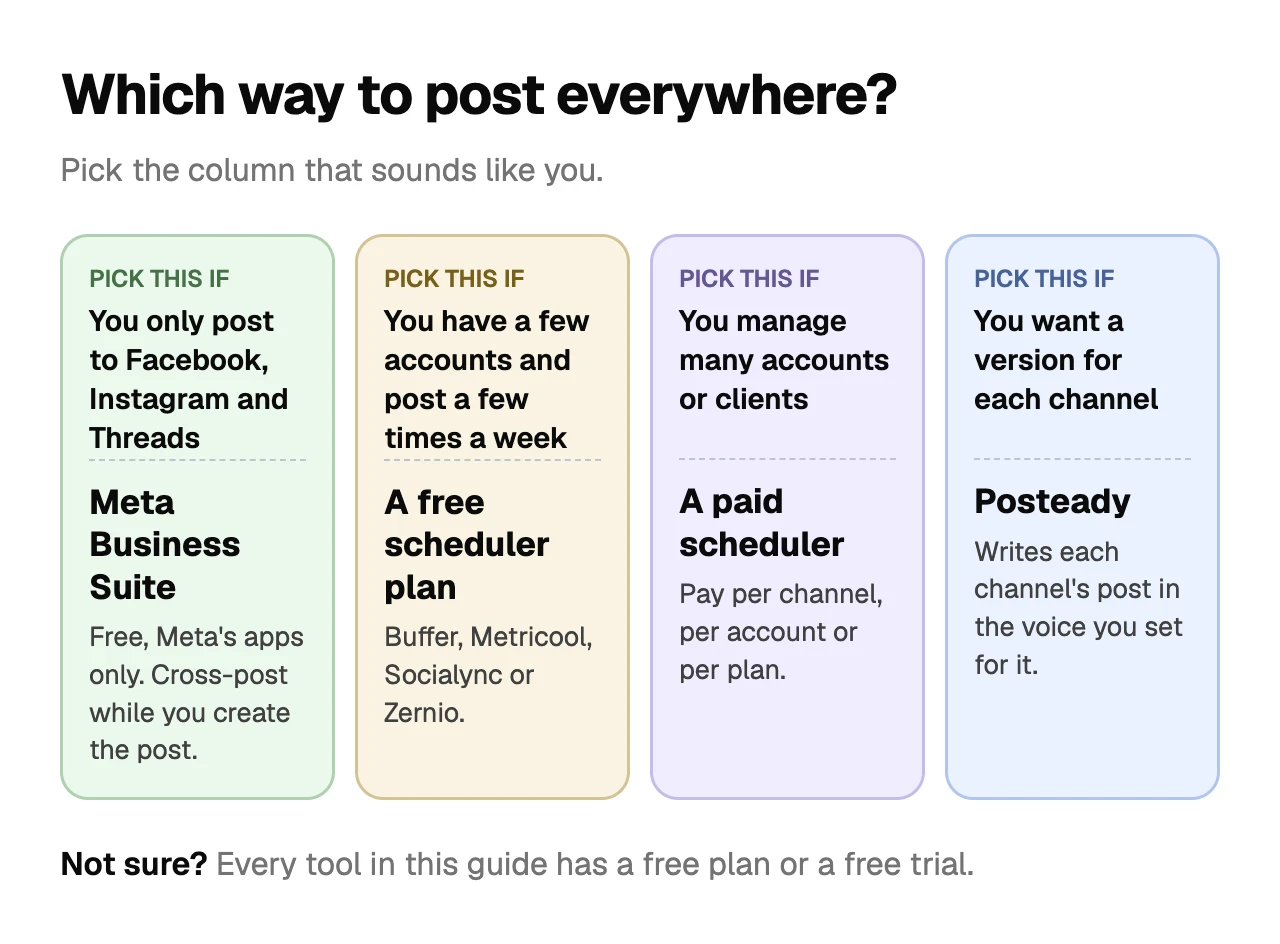
To post to all social media at once, use a scheduler. Meta Business Suite cross-posts free, but only between Facebook, Instagram and Threads.
On this page
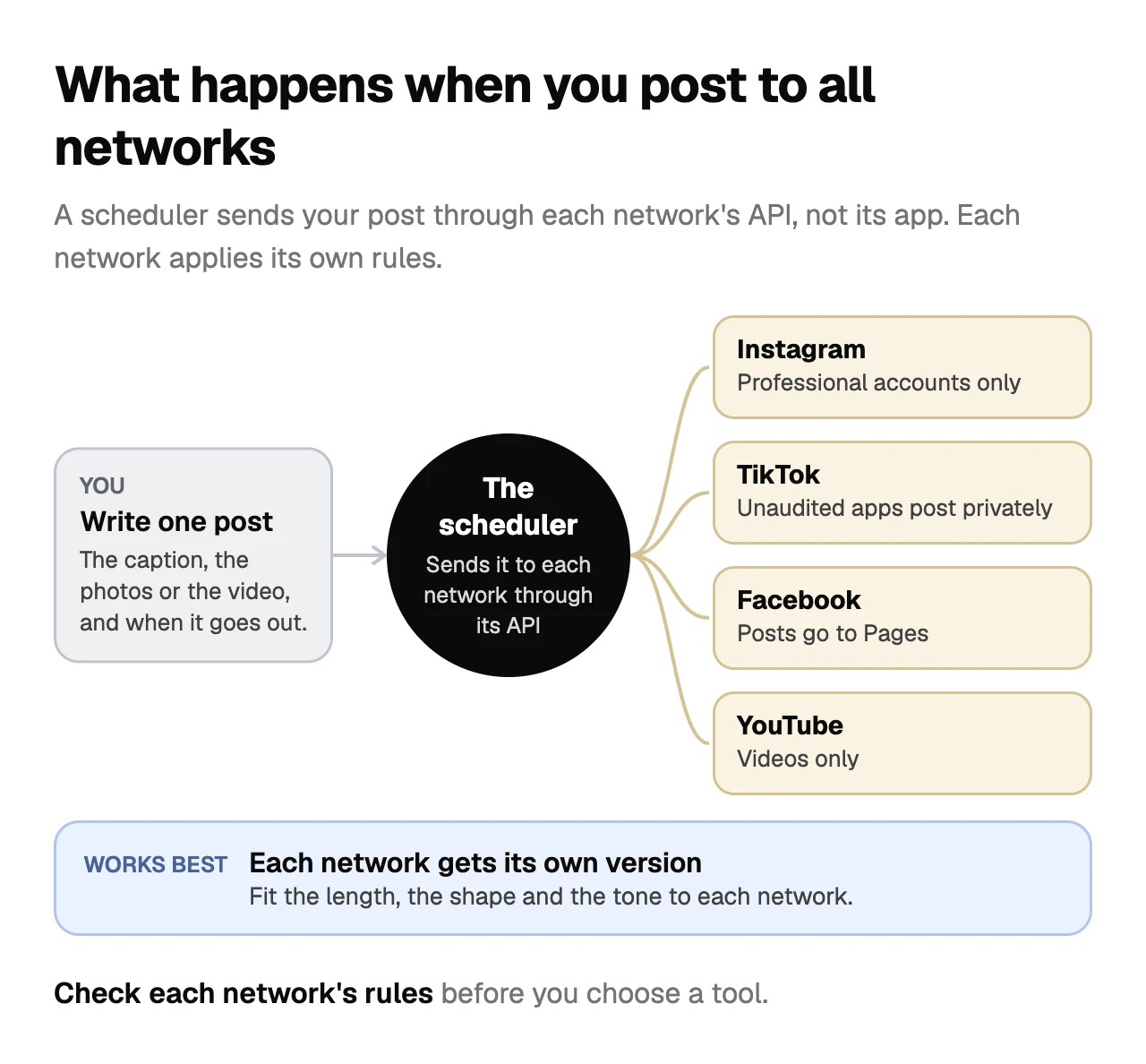
To post to all social media at once, use a scheduler that publishes through each network's API, such as Buffer or Posteady. Meta Business Suite does it for free, but only between Facebook, Instagram and Threads.[1][2] As of November 12, 2026, free scheduler plans stop at 3 channels (Buffer) or 20 posts a month (Metricool, without LinkedIn or X).[3][4]
Each network still sets its own rules for tools: Instagram only lets them post to professional accounts,[5] and TikTok keeps posts from apps it hasn't audited private.[6]
We make Posteady, one of the schedulers in this guide. Prices and limits for the other tools come from their own pricing pages, checked on November 12, 2026.
Key takeaways
- Meta Business Suite cross-posts between Facebook, Instagram and Threads at no cost. Cross-posting to Threads works on desktop only.
- For TikTok, YouTube, LinkedIn and X, you need a third-party scheduler.
- Free plans cap you at a few accounts or a few posts a month, and several leave out X.
- A scheduler can only do what each network's API allows. Instagram needs a professional account, TikTok needs an audited app for public posts, and YouTube takes videos.
- One caption rarely fits every network. X allows 280 characters in a post, while LinkedIn allows 3,000.
4 ways to post to all social media at once
| Way | Networks | Cost | The catch |
|---|---|---|---|
| Meta Business Suite | Facebook, Instagram, Threads | Free | Meta's apps only. Threads cross-posting is desktop only |
| A scheduler's free plan | Most networks | Free | 2 to 5 accounts, or 5 to 20 posts a month, and often no X |
| A paid scheduler | Most networks, including TikTok, YouTube, LinkedIn and X | Per channel, per account or per plan | Costs grow with the number of accounts |
| By hand | Every network | Free | You open each app and post again, one network at a time |
Plan limits as of November 12, 2026.
Meta Business Suite: free, but only Meta's apps
Meta Business Suite is Meta's free tool for managing Facebook, Instagram, Threads and WhatsApp.[2] While you create a post, you can choose to share it to Facebook, Instagram or Threads as well.[1]
What it can cross-post depends on the format:[1]
| You create | You can also share it to |
|---|---|
| Facebook post | Facebook Stories, Instagram Feed, Facebook Groups, Threads |
| Instagram post | Facebook Feed, Instagram Stories, Facebook Groups, Threads |
| Facebook story | Instagram Stories |
| Instagram story | Facebook Stories |
| Instagram reel | Instagram Stories, Facebook Reels, Facebook Groups |
| Facebook reel | Facebook Stories, Instagram Reels, Facebook Groups |
Threads appears in Meta's list only as a destination. Cross-posting to Threads, and sharing a Facebook post or reel to Facebook Stories, only works on the desktop version.[1] Your Facebook Page and Instagram profile also have to be connected and in the same business portfolio, and for Threads, the Threads profile has to be in that portfolio too.[1]
If your channels include TikTok, YouTube, LinkedIn or X, you need another tool for those.
What each network allows when a tool posts for you
A scheduler doesn't post the way you do in the app. It goes through each network's API, and each API has its own rules. If a network's API doesn't allow something, a scheduler can't do it automatically.
| Network | What tools can post | What to check first |
|---|---|---|
| Photos, videos, Reels, carousels and Stories | Business or creator account. Up to 100 posts through the API in 24 hours[5] | |
| Page posts | Apps get permission to publish Page posts. Meta's permission list has none for posting to a personal profile, except live video[7] | |
| Threads | Text, image, video and carousel posts | 500 characters per post, plus a text attachment of up to 10,000 characters on text-only posts[8][9] |
| TikTok | Videos and photo posts | Posts from apps TikTok hasn't audited stay private. Some tools send the video to your TikTok inbox to finish there[6][10] |
| YouTube | Videos. A square or vertical video up to 3 minutes long can be a Short[11] | Videos only[12] |
| Posts | 3,000 characters per post[13] | |
| X | Posts and threads | 280 characters, or up to 25,000 with X Premium[14][15] |
One post won't fit every network
Even when a tool can publish everywhere, one version of a post rarely suits every network.
- Length. X allows 280 characters in a post, Threads 500, an Instagram caption 2,200 and a LinkedIn post 3,000.[14][8][16][13] Our character limits guide covers how each network counts them.
- Shape. Instagram keeps photos between 1.91:1 and 3:4,[17] while a YouTube Short has to be square or vertical.[11] Our Instagram carousel size guide has the pixel sizes.
- Video length. Through the API, an Instagram Reel can run from 3 seconds to 15 minutes and a Story up to 60 seconds,[16] while a YouTube Short is up to 3 minutes.[11]
Each network also has its own culture. From what I've seen running Posteady's own seven channels, the best results come from writing each network's version in the brand voice you've set for that account, not from pasting one caption everywhere.
Free ways to post everywhere
If you don't want to pay, you have two options:
- Meta Business Suite for Facebook, Instagram and Threads.[1]
- A scheduler's free plan for the rest. As of November 12, 2026:
| Tool | Free plan |
|---|---|
| Buffer | Up to 3 channels, 10 scheduled posts per channel[3] |
| Metricool | 1 brand, up to 20 posts a month. LinkedIn and X aren't included[4] |
| Socialync | 5 posts a month across up to 5 accounts, not including X. One post sent to several networks counts once[18] |
| Zernio | Your first 2 accounts, with unlimited posts[19] |
Free plans work for a few accounts and a few posts a week. Past that, you'll hit the account or post caps.
Tools that post to all social media at once
Prices are in US dollars, from each tool's pricing page on November 12, 2026.
| Tool | Free plan | Cheapest paid plan | Accounts on that plan | Free trial |
|---|---|---|---|---|
| Buffer | Yes | $6 per channel a month ($5 billed yearly)[3] | You pay per channel | 14 days |
| Metricool | Yes | $25 a month ($20 billed yearly), plus $10 a month for each X account[4] | Up to 5 brands | Not stated |
| SocialBee | No | $29 a month ($290 a year)[20] | 5 profiles | 14 days |
| Later | No | $18.75 a month, billed yearly[21] | 8 profiles, one per network | 14 days |
| Hootsuite | No | $99 per user a month, billed yearly (Standard)[22] | 10 accounts | 14 days |
| Socialync | Yes | $20 a month[18] | 5 accounts | 7 days, card required |
| Blotato | No | $29 a month[23] | 20 accounts | 7 days, card required |
| Zernio | Yes | $6 a month per account, for accounts 3 to 10[19] | You pay per account | Not stated |
Two things to check before you choose. First, make sure the tool publishes to every network you use. X is the one most often missing or charged extra: Later's supported networks don't include it,[21] Metricool charges $10 a month for each X account on paid plans,[4] and Socialync includes one X account on paid plans and charges $10 a month for each extra one.[18] Second, count your accounts, not just your networks. An agency with five clients on four networks needs 20 accounts.
How to post to all social media at once with Posteady
Posteady publishes to seven networks: Instagram, TikTok, YouTube, X, LinkedIn, Threads and Facebook Pages.[24] In its multi-channel scheduler, you write one shared caption and tailor it for each channel. You can also have AI content repurposing write each channel's version for you, in your brand voice.[25]
Posteady doesn't publish to Pinterest, Bluesky or Google Business Profile, which Buffer supports,[3] and each post goes to one account per network. To send the same post to several clients' Instagram accounts, you create one post per client.
- Connect your accounts and create a brand voice for each one. Posteady won't write a channel's post until that account has a brand voice.
- Click New post at the top and choose Write with AI. Add your source on the Link, Prompt, Remix, Text or File tab.
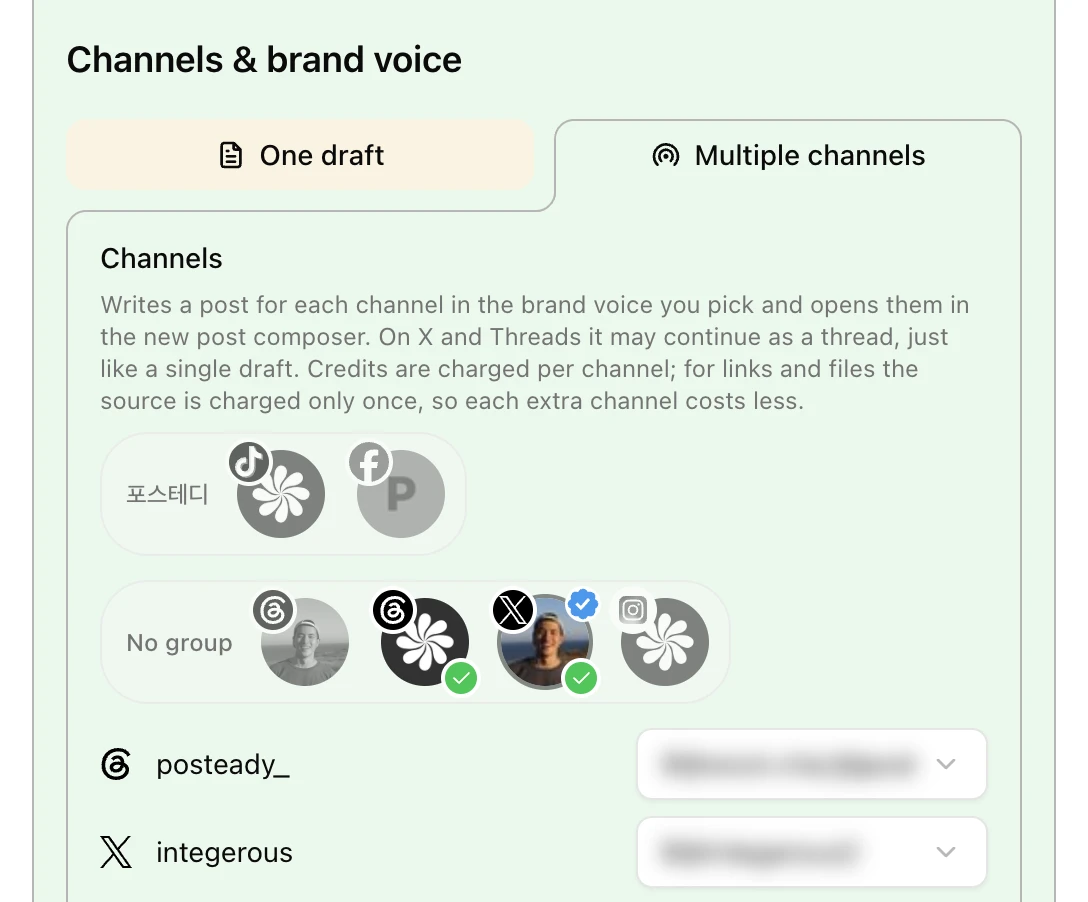
- Click Choose channels & brand voice, then on the Multiple channels tab pick the channels to post to, one account per network.
- Click the button that shows how many channels you picked, such as Generate content for 2 channels. Posteady writes a post for each channel in that account's brand voice and opens them all in the new post composer.
- Add a photo or video for Instagram, TikTok and YouTube if your source has none. Review each version, then post now or schedule.
When I post to our seven channels this way, the drafts need almost no editing. Reviewing them takes me about 3 minutes. Each channel's version uses AI credits.
Frequently asked questions
Can you post to all social media at once for free?
No, not with one tool. As of November 12, 2026, no free plan in this guide covers every major network: Buffer's stops at 3 channels, Metricool's leaves out LinkedIn and X, and Socialync's leaves out X.[3][4][18] For Facebook, Instagram and Threads, Meta Business Suite cross-posts for free.[1][2]
Is it bad to post the same content on every platform?
No, but in our experience tailored posts do better. As of November 12, 2026, the limits differ a lot, such as 280 characters on X and 3,000 on LinkedIn,[14][13] and each network has its own culture. On Posteady's own seven channels, posts written in each channel's brand voice get the best results.
Can you post to TikTok and Instagram Reels at the same time?
Yes, with a scheduler that supports both. As of November 12, 2026, Meta Business Suite can't, because it only covers Meta's apps.[1] On TikTok, posts from apps TikTok hasn't audited stay private, so check that your tool can post publicly.[6]
Why did my scheduled TikTok post end up private or in my inbox?
Because of how the tool connects to TikTok. As of November 12, 2026, TikTok limits posts from apps it hasn't audited to private viewing,[6] and some tools use TikTok's upload option, which sends the video to your TikTok inbox, where you finish and post it yourself.[10]
Can a scheduler post to my personal Facebook profile?
Not automatically. As of November 12, 2026, Meta's permission list lets apps publish Page posts but has no permission for posting to a personal profile, except live video.[7] Some tools work around this with reminders. SocialBee, for example, sends a phone notification at the scheduled time so you can paste the caption and post it yourself.[26]
Sources
-
Meta Business Help Center, About cross-posting to Facebook, Instagram and Threads in Meta Business Suite. Checked November 12, 2026. ↩︎ ↩︎ ↩︎ ↩︎ ↩︎ ↩︎ ↩︎ ↩︎
-
Meta Business Help Center, How Meta Business Suite works. Checked November 12, 2026. ↩︎ ↩︎ ↩︎
-
Metricool, Pricing. Checked November 12, 2026. ↩︎ ↩︎ ↩︎ ↩︎ ↩︎
-
Meta for Developers, Content Publishing. Checked November 12, 2026. ↩︎ ↩︎
-
TikTok for Developers, Content Posting API: Get started (updated August 4, 2026). Checked November 12, 2026. ↩︎ ↩︎ ↩︎ ↩︎
-
Meta for Developers, Permissions reference. Checked November 12, 2026. ↩︎ ↩︎
-
Meta for Developers, Threads API: Posts. Checked November 12, 2026. ↩︎ ↩︎
-
Meta for Developers, Threads API: Text Attachments. Checked November 12, 2026. ↩︎
-
TikTok for Developers, Upload draft to TikTok (updated August 4, 2026). Checked November 12, 2026. ↩︎ ↩︎
-
YouTube Help, Upload YouTube Shorts. Checked November 12, 2026. ↩︎ ↩︎ ↩︎
-
Google for Developers, YouTube Data API: Videos. Checked November 6, 2026. ↩︎
-
LinkedIn Help, Post and share updates. Checked November 6, 2026. ↩︎ ↩︎ ↩︎
-
X Developer Platform, Counting characters. Checked November 6, 2026. ↩︎ ↩︎ ↩︎
-
Meta for Developers, IG User Media reference. Checked November 12, 2026. ↩︎ ↩︎
-
Instagram Help Center, Image resolution of photos you share on Instagram. Checked November 6, 2026. ↩︎
-
Posteady, Multi-Channel Social Media Scheduler. Checked November 12, 2026. ↩︎
-
Posteady, AI Content Repurposing. Checked November 12, 2026. ↩︎
Written by
Ryan Han · Founder
Ryan Han is the founder of Posteady, a social media scheduling and analytics tool for marketers, creators, and agencies. He builds the product hands-on, checks each platform's scheduling rules and limits against official docs and real posts, and writes up what he finds.