OpusClip Alternatives: 6 AI Clip Makers, Free and Paid
Vizard is the closest OpusClip alternative. Klap charges per clip, Choppity per hour of analysis, and Posteady adds AI clipping to a social media scheduler.
On this page
Vizard is the closest OpusClip alternative. It also charges 1 credit per minute of video, gives you 60 free credits a month, and costs $14.50 a month billed yearly.[1] Klap charges per clip instead of per minute,[2] and Choppity charges per hour of analysis.[3] Descript adds clipping to a transcript-based editor,[4] Riverside adds it to a recording studio,[5] and Posteady adds it to a scheduler for seven social channels.[6]
OpusClip (often searched as "Opus Clip") turns long videos into short clips and posts them for you. Its free plan includes 60 credits a month, and paid plans start at $15 a month.[7] One credit covers one minute of the original video, so a 60-minute podcast uses 60 credits.[8]
Disclosure: we make Posteady. Everything else in this post comes from each company's public pricing and help pages, checked on November 7, 2026. We didn't run paid tests of the other tools.
Key takeaways
- Closest match: Vizard. It uses the same 1-credit-per-minute model as OpusClip, with 60 free credits a month. The Creator plan is $29 a month, or $14.50 billed yearly.[1]
- Pay per clip: Klap. Only the clips you generate count, and a source video can run up to 3 hours. Plans start at $29 a month ($14.50 billed yearly) for 100 clips.[2]
- Pay per hour: Choppity. Plans are sized by hours of AI analysis, from 3 hours on Starter at $24 a month ($16.80 billed yearly).[3]
- Editing first: Descript. You edit a video by editing its transcript, and Create Clips finds the highlights.[4]
- Recording first: Riverside. If you already record there, Magic Clips is included from the Pro plan.[5]
- Clips plus the rest of your social media: Posteady. Clipping, AI writing, carousels and scheduling to seven channels share one workspace and one credit balance.[6][9]
OpusClip alternatives at a glance
| Tool | Free option | Paid plans from | What uses up your plan | Posting to social media |
|---|---|---|---|---|
| OpusClip | Free plan: 60 credits a month, with a watermark | Starter $15/month. Pro $29/month, or $14.50 billed yearly | 1 credit per minute of source video | Starter: auto-posts to YouTube Shorts, TikTok and Instagram Reels. Pro adds a scheduler |
| Posteady | 7-day free trial | Creator $29/month (30% off billed yearly) | Credits: 10 + 1 per minute to analyze, 5 per rendered clip (10 over 90 seconds) | Schedules to 7 channels |
| Vizard | Free plan: 60 credits a month, 720p, with a watermark | Creator $29/month, or $14.50 billed yearly | 1 credit per minute of video | Creator: scheduling, 6 social accounts |
| Klap | 1 video free (preview and edit only) | Basic $29/month, or $14.50 billed yearly | 1 per generated clip (100 a month on Basic) | Unlimited social accounts |
| Choppity | Free plan: 1 hour of analysis, no downloads | Starter $24/month, or $16.80 billed yearly | Hours of AI analysis (3 on Starter) | Starter: scheduling, 1 social account |
| Descript | Free plan: 60 media minutes a month, 720p export | Hobbyist $24/month, or $16 billed yearly | Media hours (10 on Hobbyist) and AI credits | No scheduler on its pricing page |
| Riverside | 14-day free trial | Pro $35/month, or $24 billed yearly | Plan limits. Magic Clips uses no credits | Pro: publishing. Grow ($45/month): scheduling |
Last reviewed: November 7, 2026. Prices are in US dollars and change often, so check each pricing page before you buy.
What OpusClip offers, and what it costs
Every tool in this post follows the same four steps: you add a long video, AI finds the highlights, you polish the clips, and the clips get posted. The tools differ most in how AI finds highlights and in how the clips get posted.
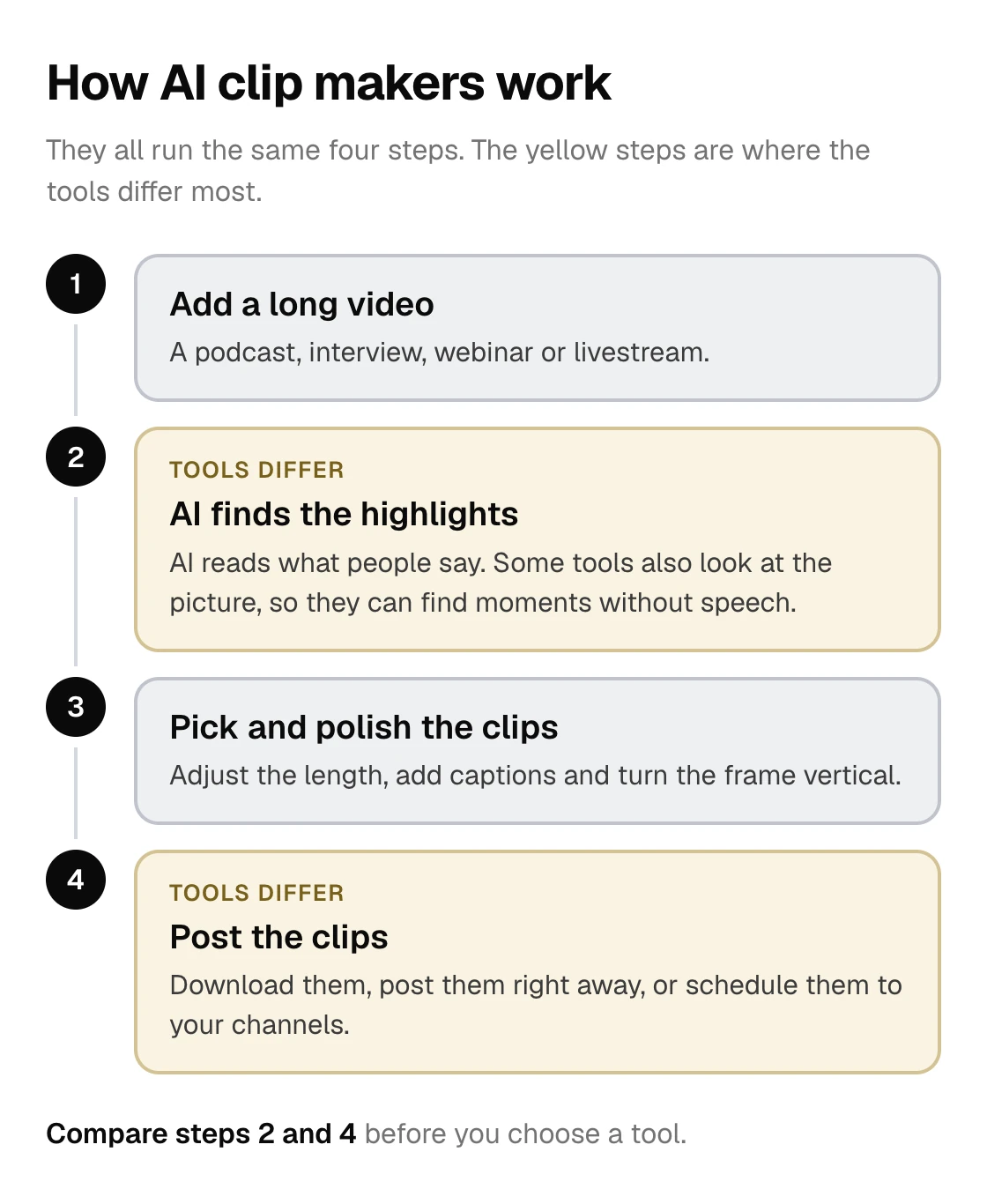
OpusClip finds the moments in a long video that are likely to work as shorts, gives each clip a virality score, and adds captions and reframing.[7] Its ClipAnything feature also uses visual, audio and sentiment cues, so you can ask for moments without dialogue, like a goal in a soccer match.[10]
- Free: 60 credits a month and clips up to 1080p. Clips carry a watermark, you can't edit them, and you can export them for 3 days.[7]
- Starter: $15 a month, monthly billing only. You get 150 credits a month, no watermark, and auto-posting to YouTube Shorts, TikTok and Instagram Reels.[7]
- Pro: $29 a month, or $14.50 a month billed yearly with 3,600 credits for the year. It adds a social media scheduler, a team workspace with 2 seats and 6 social account connections.[7]
- Credits: processing costs 1 credit per minute of the original video. Posting to X costs 3 credits per post, per account.[8]
- Where it posts: YouTube, Instagram Reels, TikTok, Facebook Pages, LinkedIn business pages, X, Pinterest, Threads and Bluesky.[11]
Is OpusClip free? Yes, with limits. The free plan adds a watermark, and its clips stop being exportable after 3 days.[7]
Why people look for an OpusClip alternative
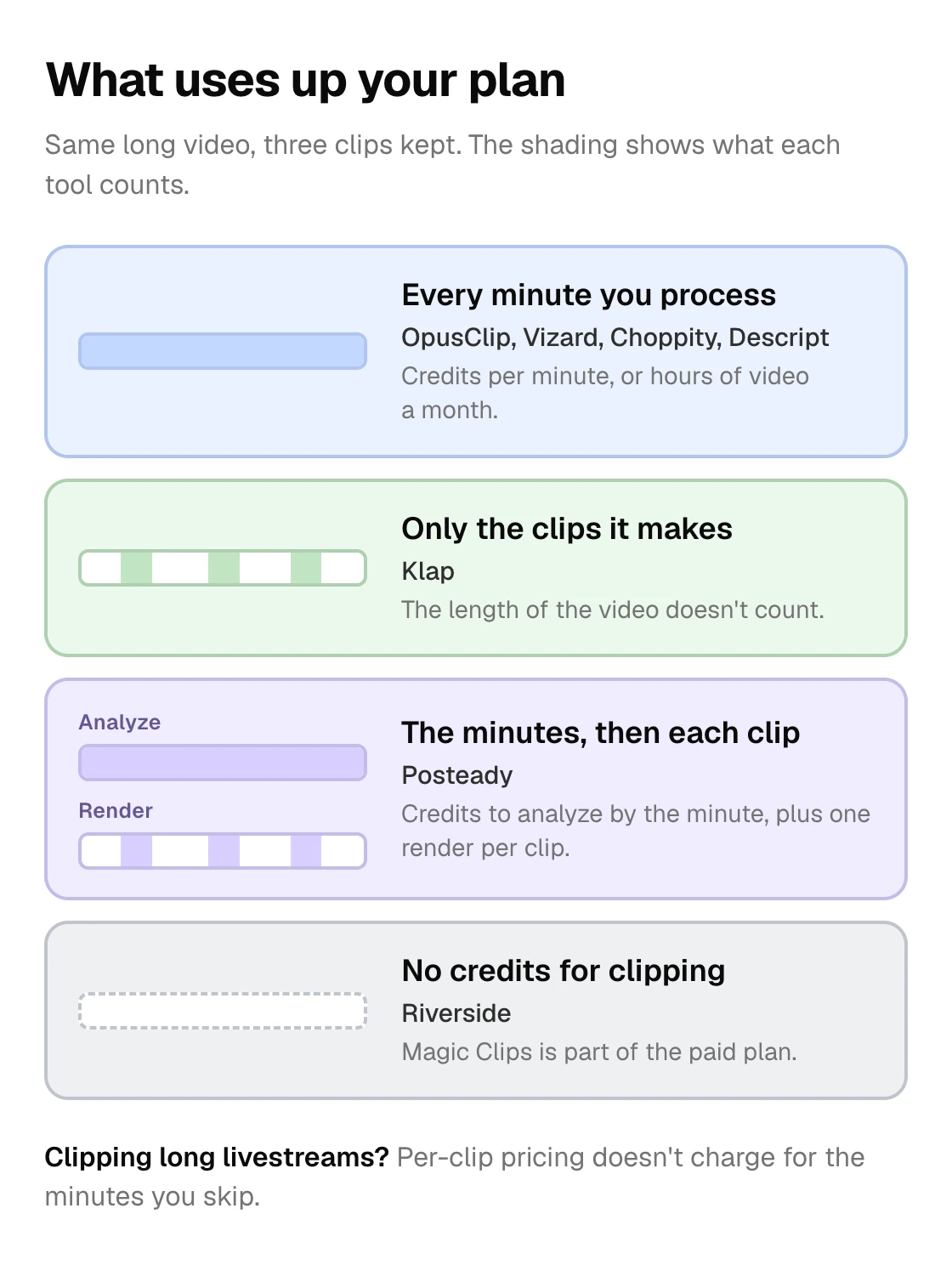
- Long videos use credits fast. Credits follow the length of the source, not the number of clips you keep. A 2-hour livestream uses 120 of Starter's 150 monthly credits.[8][7]
- The free plan is for testing. Watermarked clips and a 3-day export window make it hard to post regularly for free.[7]
- Clips are only part of the job. If you also write posts, design carousels and schedule everything, a separate clipping tool means another login and another bill.
The tools in this post count usage in four different ways:
1. Posteady: clips next to the rest of your social media
Posteady is a social media workspace with an AI clip maker built in. You add a long video, and AI reads what people say and suggests highlights. You can then schedule the clips with the rest of your posts.[9]
- Finding highlights: AI suggests up to 8 highlights per analysis. Clip length is automatic (20 to 90 seconds), or you can choose a range of up to 180 seconds. You can also cut ranges yourself.[9]
- Sources: upload a video of up to 3 hours and 10 GB, import one from Google Drive, or paste a video link.[9]
- Ready-to-post clips: when a horizontal video becomes vertical, the frame follows whoever is speaking. Captions are added automatically, or you can bring your own SRT or VTT file. You can join several ranges into one clip, or replace the original voice with an AI voice that reads the captions.[9]
- Posting: schedule clips to Instagram, YouTube, TikTok, Facebook, Threads, X and LinkedIn, next to your other posts.[9]
- Price: the Creator plan is $29 a month with 1,500 AI credits, and you can start with a 7-day free trial. Analyzing a video costs 10 credits plus 1 per minute. Rendering a clip costs 5 credits, or 10 for clips over 90 seconds.[6]
- Limits: AI picks highlights from what people say, so it can't find moments without speech. Clips run up to 3 minutes, and it doesn't post to Pinterest or Bluesky.[9]
Best for: agencies and small teams that manage several brands and want clipping, writing and scheduling in one place.
2. Vizard: the closest like-for-like alternative
Vizard works much like OpusClip. AI cuts long videos into clips, and you can edit and schedule them in the same app. Like OpusClip, 1 credit equals 1 minute of video.[1]
- Free: 60 credits a month, 720p export with a watermark, uploads of up to 60 minutes and 1 GB, and 3-day storage. You can connect 1 social account.[1]
- Creator: $29 a month, or $14.50 billed yearly, from 600 credits a month. It removes the watermark, exports in 4K, takes uploads of up to 600 minutes and 30 GB, and schedules posts to 6 social accounts.[1]
- Business: $39 a month, or $19.50 billed yearly. It adds a shared workspace, 20 social accounts, a brand kit and team seats at $5 a month each.[1]
Best for: people who like OpusClip's workflow and want a similar tool with scheduling on the entry paid plan.
3. Klap: pay per clip, not per minute
Klap counts the clips it generates, not the length of your video. A source video can run up to 3 hours, and a long recording costs the same as a short one.[2]
- Plans: Basic is $29 a month for 100 clips, Pro $79 for 300 clips and Pro+ $189 for 1,000 clips. Billed yearly, they cost $14.50, $39.50 and $94.50 a month.[2]
- Free: you can try 1 video for free. You can preview and edit the clips, but downloading and posting them needs a paid plan.[2]
- Every plan: AI clipping, unlimited social accounts and analytics. Paid exports carry no Klap branding.[2]
Best for: long livestreams and podcasts, where per-minute credits add up fast.
4. Choppity: pay by hours of analysis
Choppity sizes its plans by hours of AI video analysis.[3]
- Free: 1 hour of analysis and 3-day project storage. Downloads and scheduling start on the Starter plan.[3]
- Starter: $24 a month, or $16.80 billed yearly, for 3 hours of analysis. You can export in 1080p or 4K and schedule posts to 1 social account.[3]
- Creator: $32 a month, or $22.40 billed yearly, for 5 hours. It adds bulk uploads (up to 10), 3 social accounts, custom fonts and a brand template.[3]
- Team: $48 a month, or $33.60 billed yearly, with unlimited seats and 6 social accounts.[3]
Best for: a few hours of video a month, on a fixed budget.
5. Descript: edit by transcript, then clip
Descript is a full video and podcast editor. You edit the video by editing its transcript, and the Create Clips tool finds highlights to repurpose.[4]
- Free: 60 media minutes a month and 100 AI credits (one time). Exports are 720p.[4]
- Hobbyist: $24 a month, or $16 billed yearly. You get 10 media hours and 400 AI credits a month, and watermark-free 1080p exports.[4]
- Creator: $35 a month, or $24 billed yearly, with 30 media hours, 800 AI credits and 4K exports.[4]
- Its pricing page doesn't list a social media scheduler, so you post the clips yourself.[4]
Best for: editors who want full control over every cut.
6. Riverside: if you already record there
Riverside is a remote recording studio for podcasts and interviews. Its paid plans include text-based editing and Magic Clips, which turns recordings into short clips.[5]
- Pro: $35 a month, or $24 billed yearly. It includes 4K recording, Magic Clips, show notes, podcast hosting and publishing to YouTube, Instagram, LinkedIn and more.[5]
- Grow: $45 a month, or $34 billed yearly. It adds social media scheduling, a newsletter and live streaming.[5]
- Paid plans start with a 14-day free trial. Core AI features like Magic Clips don't use credits.[5]
Best for: podcasters and interviewers who record in Riverside.
Is there a free OpusClip alternative?
Every tool here limits what you can do for free:
- Vizard: 60 credits a month, with watermarked 720p exports.[1]
- Descript: 60 media minutes a month, with 720p exports.[4]
- Choppity: 1 hour of analysis, but downloads start on a paid plan.[3]
- Klap: 1 video to try, but downloading and posting need a paid plan.[2]
- Posteady and Riverside: free trials of 7 and 14 days.[6][5]
If you need to post clips every week, plan on a paid plan with any of these tools.
How to choose
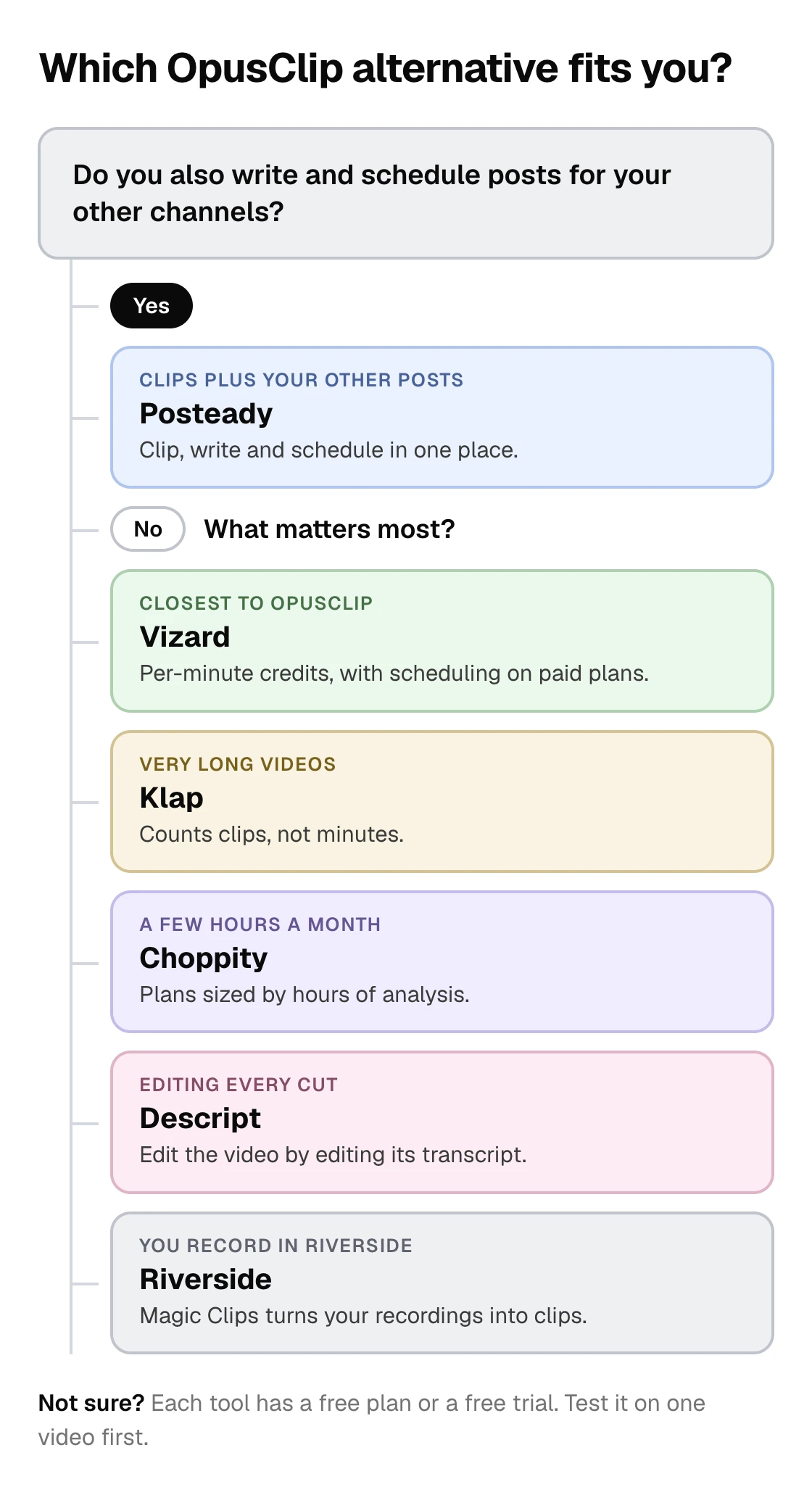
- You like OpusClip but want another option: try Vizard.
- Your videos are long (livestreams, 3-hour podcasts): Klap counts clips, not minutes.
- You clip a few hours a month on a fixed budget: Choppity.
- You want to edit every cut yourself: Descript.
- You already record in Riverside: use its Magic Clips.
- Clips are one part of your social media work: Posteady keeps clipping, writing and scheduling together.
Frequently asked questions
What is the best OpusClip alternative?
Vizard is the closest match. It also charges 1 credit per minute of video and has a free plan with 60 credits a month. For long videos, Klap charges per clip instead. If you also write and schedule posts for other channels, Posteady keeps clipping and scheduling in one place.
Is OpusClip free?
Yes, with limits. The free plan gives you 60 credits a month, adds a watermark, doesn't let you edit clips, and lets you export each clip for only 3 days.
How much does OpusClip cost?
As of November 7, 2026, Starter is $15 a month with 150 credits, billed monthly only. Pro is $29 a month, or $14.50 a month billed yearly, and adds a scheduler, 2 seats and 6 social accounts.
How do OpusClip credits work?
One credit covers one minute of the original video, however many clips you keep. A 60-minute podcast uses 60 credits, and posting to X costs 3 credits per post, per account.
Which OpusClip alternative is best for long videos?
Klap, because it counts the clips it generates, not the minutes you upload. A source video can run up to 3 hours, so a long livestream costs the same as a short video.
Which OpusClip alternatives can schedule clips to social media?
Vizard's Creator plan schedules to 6 social accounts, Choppity's Starter plan to 1, and Riverside adds scheduling on its Grow plan. Posteady schedules clips to seven channels next to your other posts. Klap connects unlimited social accounts on every plan, and Descript's pricing page doesn't list a scheduler.
Sources
-
Vizard, Plans & Pricing. Checked November 7, 2026. ↩︎ ↩︎ ↩︎ ↩︎ ↩︎ ↩︎ ↩︎
-
Klap, Klap pricing (prices updated November 4, 2026). Checked November 7, 2026. ↩︎ ↩︎ ↩︎ ↩︎ ↩︎ ↩︎ ↩︎
-
Choppity, Pricing. Checked November 7, 2026. ↩︎ ↩︎ ↩︎ ↩︎ ↩︎ ↩︎ ↩︎ ↩︎
-
Descript, Pricing. Checked November 7, 2026. ↩︎ ↩︎ ↩︎ ↩︎ ↩︎ ↩︎ ↩︎ ↩︎
-
Riverside, Pricing. Checked November 7, 2026. ↩︎ ↩︎ ↩︎ ↩︎ ↩︎ ↩︎ ↩︎
-
OpusClip, Pricing. Checked November 7, 2026. ↩︎ ↩︎ ↩︎ ↩︎ ↩︎ ↩︎ ↩︎ ↩︎
-
OpusClip Help Center, How Do Credits Work?. Checked November 7, 2026. ↩︎ ↩︎ ↩︎
-
Posteady, AI Clip Maker. Checked November 7, 2026. ↩︎ ↩︎ ↩︎ ↩︎ ↩︎ ↩︎ ↩︎
-
OpusClip, ClipAnything. Checked November 7, 2026. ↩︎
Written by
Ryan Han · Founder
Ryan Han is the founder of Posteady, a social media scheduling and analytics tool for marketers, creators, and agencies. He builds the product hands-on, checks each platform's scheduling rules and limits against official docs and real posts, and writes up what he finds.